Part 3 · Test in the test pane
Run the full flow with five prompts and check the key points.
7. Test in the test pane
▶ Goal: Run the full flow in the Test pane before deployment. The preview shows reasoning steps and tool calls in real time (Part 1, section 0.2).
7.1 Recommended test scenario (measured flow)
Enter the five prompts below in order and verify that each step works. In one flow, Knowledge (Excel and policy Word document), skills, and tools all work together.
Before testing, save the agent by selecting the Save button in the upper-right corner, then continue with the test.
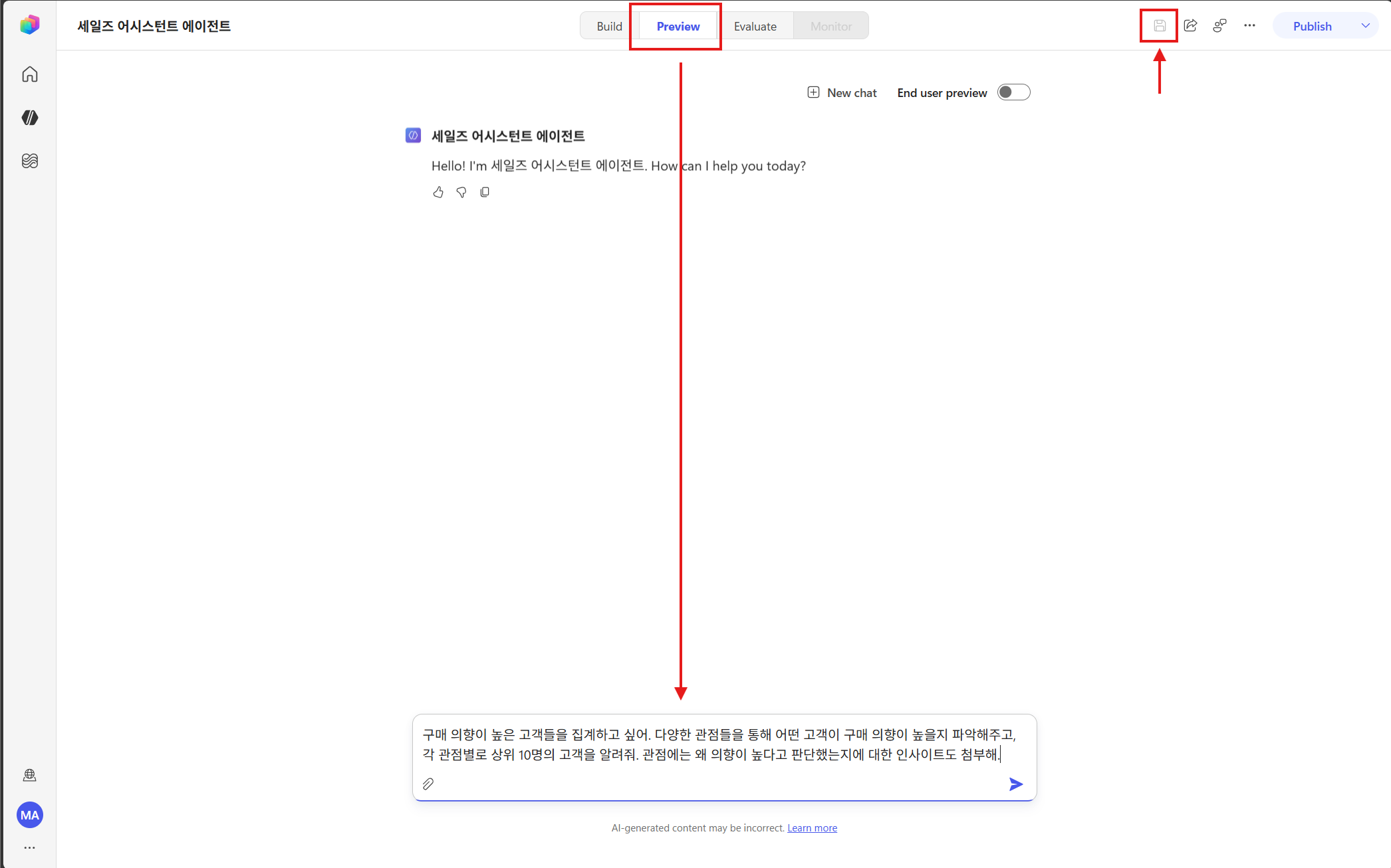
Prompt #1 — Aggregate customers with purchase intent (multi-perspective + insights)
I want to aggregate customers who are likely to purchase. Identify which customers are likely to have high purchase intent from multiple perspectives,
and tell me the top 10 customers for each perspective. For each perspective, also include insights on why you judged their intent to be high.
→ Search the SharePoint Excel file → perform multi-perspective aggregation with code → top 10 table by perspective + insights by perspective.
Prompt #2 — Organize duplicate customers (top-priority/priority)
Organize the customers who appear repeatedly across the different perspectives.
I want to divide them into top-priority and priority customers so we can proceed with golf, dinner, and gift delivery.
→ Analyze intersections across perspectives → select customers with high duplicate frequency → separate top-priority and priority groups.
Prompt #3 — Hospitality and gift precautions (using policy document)
Are there any precautions we should take when offering golf, dinner, or gifts?
→ Reference the internal Word policy document → summarize hospitality and gift limits/prohibitions, with sources cited. ← The policy document connected in Chapter 3 is used here.
Prompt #4 — Create a single dashboard
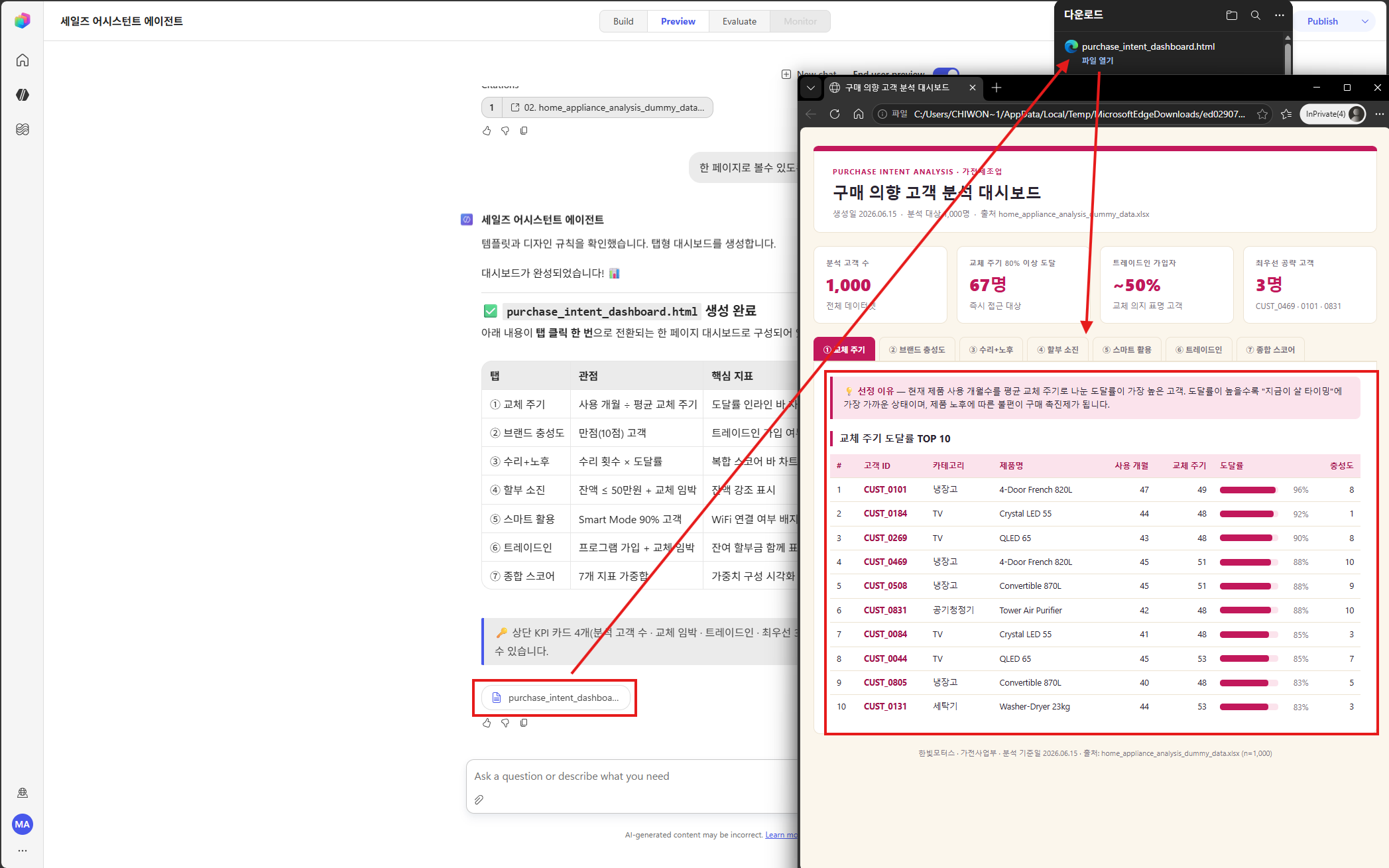
Create one dashboard that includes status and insights by perspective, priority and top-priority customer information, and event precautions.
→ Email/report skill → create and save a company-designed HTML dashboard (integrating analysis + insights + customers + precautions).
Prompt #5 — Send email (me + team lead)
Send this content and the dashboard as an attachment by email to me and my team lead.
→ Upload to OneDrive → attach link → preview recipients, subject, and body + request confirmation → send after approval.
7.2 What to check
- ✅ Are the numbers based on code calculations (no estimates or fabricated figures)?
- ✅ Does the precautions answer (#3) rely on the Word policy document (no fabrication, sources cited)?
- ✅ Does the dashboard follow the company design (ivory and magenta)?
- ✅ Is the email attached as a OneDrive link (not a direct Base64 attachment)?
- ✅ Does it require confirmation before sending (recipients: me + team lead)?
- ✅ Were skill resources actually injected? → If not, check the 5.4 bug.
7.3 Self-recovery examples observed in testing (reference)
These are cases where the agent found a workaround on its own during testing — the new core’s “adaptation” capability (Part 1, section 2.2).
- Preprocessing script hit a permission error → switched to direct pandas analysis.
- Specific ML package was not installed → replaced with manual normalization.
- Temporary file parsing failed once → resolved by retrying.
Checkpoint: This kind of self-recovery is normal. However, missing skill resources (5.4) cannot be self-recovered, so if the design looks wrong, suspect skill injection first.