Adopting the GitHub Copilot Harness: Cost Control and Governance in Copilot Studio
How to discover GitHub Copilot harness agents, classify their environments, and use Power Platform controls to manage Copilot Credit consumption during maker development and production use.
Translated article — This article is based on Adopting the GitHub Copilot Harness: Cost Control and Governance in Copilot Studio by lewisdoesdev (@lewisdoesdev) on The Custom Engine (2026-08-07). The original wording takes precedence.
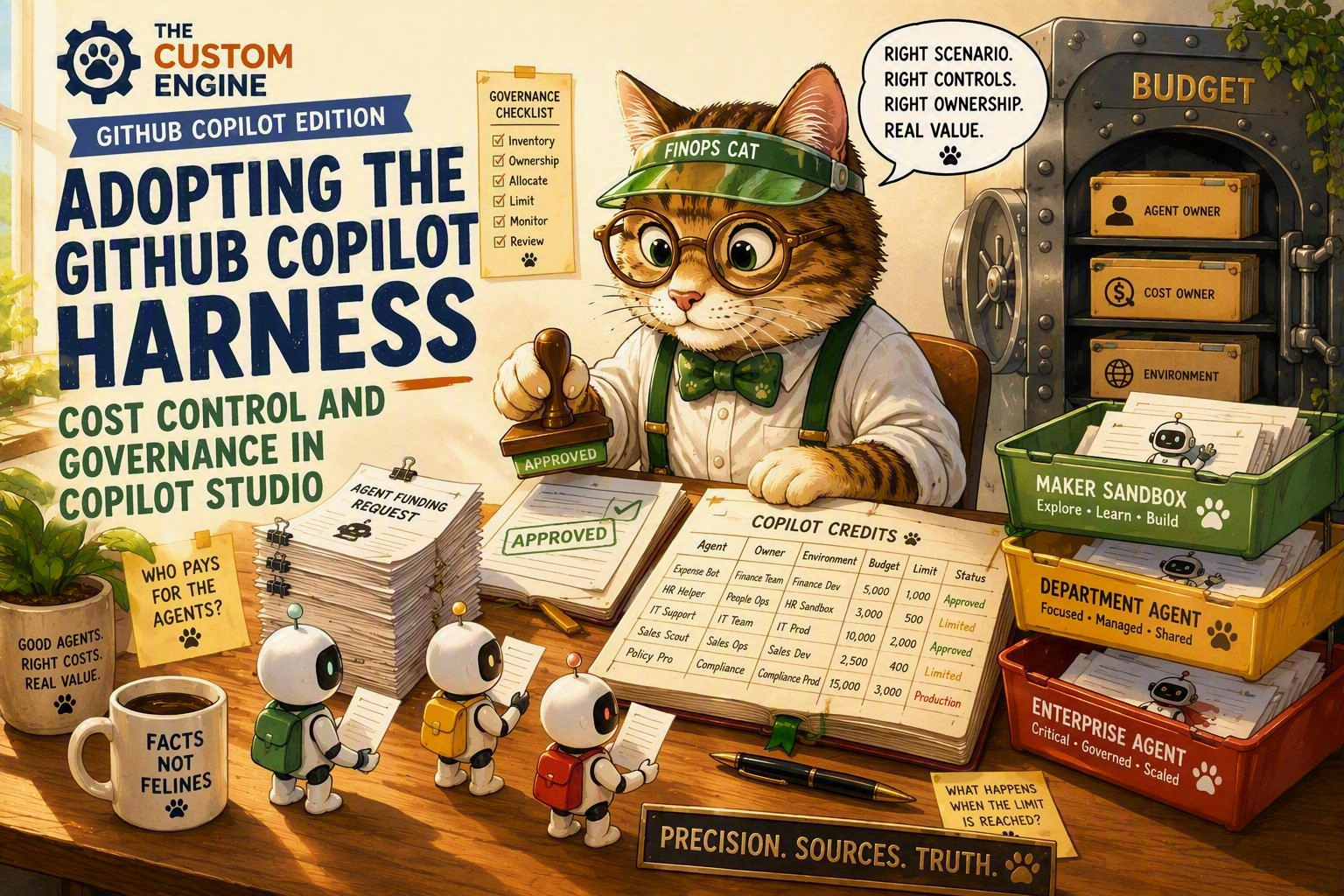
As AI agents become more capable, consumption is becoming an increasingly important part of how organizations plan and govern agent usage. Makers using the GitHub Copilot harness in Copilot Studio can consume Copilot Credits while building, previewing, and evaluating agents before those agents enter a formal production lifecycle. This changes when administrators need to apply consumption controls.
An environment used for maker exploration can now incur consumption even if the agents in it are never published for production use. Maker development and funded production usage require different approaches to capacity, ownership, and continuity, regardless of the environment type.
A practical baseline for reducing exposure is:
- Find GitHub Copilot harness agents and the environments that contain them.
- Classify those environments as maker development or funded production.
- Review allocations, tenant-pool access, pay-as-you-go billing, and enforcement rules.
- Apply agent-level limits where individual consumption needs a tighter boundary.
- Repeat the review periodically, or automate detection of newly created environments and agents.
This article proposes a repeatable governance process for controlling Copilot Credit consumption, then shows how to implement it in the Power Platform admin center (PPAC) and, at scale, through the Power Platform API.
Choose controls based on the environment purpose
Environments where makers explore, build, preview, and evaluate agents need clear development boundaries. Environments that support funded production usage need controls aligned to their funding model, ownership, expected usage, and criticality. The same controls are available in both scenarios, but how you apply them should reflect what the environment exists to support.
Maker development can now incur Copilot Credit consumption before an agent enters a formal production lifecycle.
Use the environment purpose to decide where to start.
Maker development
Environments where makers explore, build, preview, and evaluate agents need controls before those agents enter a formal production lifecycle. Detect GitHub Copilot harness agents, apply a default agent limit, decide whether tenant-pool or pay-as-you-go access is appropriate, notify the agent owner of the boundary, and define how they can request more capacity.
Funded production usage
Environments that support approved departmental or organization-wide processes need accountable ownership and intentional funding. Confirm the cost owner and funding model, allocate capacity or configure billing intentionally, set limits based on expected usage and service criticality, and monitor consumption that could interrupt the production service.
First find the affected agents and environments, then apply the controls that match their purpose.
Discover and classify affected agents and environments
Now that there are two scenarios, handle each with the processes and controls that make sense. Governance and control are never achieved well through a one-size-fits-all approach that ignores what is being built.
For each GitHub Copilot harness agent, first identify:
- the environment that contains the agent
- whether that environment is for maker development or funded production usage
- the agent owner and the person accountable for its consumption
- whether the current allocation, overage settings, and actual consumption match that purpose
[Discover GitHub Copilot harness agents]
              │
              ▼
[Identify the environment each agent belongs to]
        │            │
        ▼            ▼
[Classify the       [Identify the agent owner
 environment as      and accountable
 maker development   cost owner]
 or production]
        │            │
        └─────┬──────┘
              ▼
[Review allocation and consumption controls for the environment and agent]
To support this, start with Power Platform Inventory to find Copilot Studio agents and the environments that contain them. For a small estate, PPAC inventory may be enough. At scale, use Azure Resource Graph or the Power Platform Inventory API to make the review repeatable.
The isCLIAgent property identifies agents that use the GitHub Copilot harness. These agents can consume Copilot Credits in maker environments at design time. The request below returns those agents along with their environment IDs and owner IDs.
POST https://api.powerplatform.com/resourcequery/resources/query?api-version=2024-10-01
Content-Type: application/json

{
  "TableName": "PowerPlatformResources",
  "Clauses": [
    {
      "$type": "where",
      "FieldName": "type",
      "Operator": "==",
      "Values": ["'microsoft.copilotstudio/agents'"]
    },
    {
      "$type": "where",
      "FieldName": "properties.isCLIAgent",
      "Operator": "==",
      "Values": ["true"]
    },
    {
      "$type": "project",
      "FieldList": [
        "name",
        "properties.displayName",
        "properties.environmentId",
        "properties.ownerId",
        "properties.isCLIAgent"
      ]
    }
  ]
}
Inventory returns the technical relationship between the agent, owner, and environment. Combine that with your environment naming conventions, environment groups, governance metadata, and approval records to get the business context needed for classification. If you already use Copilot Agent Kit or Compliance Hub, you can extend that inventory with the scenario and cost-ownership information your process uses.
Apply environment-level controls
After classifying an environment, review how it can access Copilot Credits and what should happen when available capacity is exhausted.
| Decision | Available control |
|---|---|
| Should prepaid capacity be reserved for this environment? | Allocate Copilot Credits to the environment |
| Can this environment draw from unallocated capacity in the tenant pool? | Enable or disable tenant-pool draw |
| Can consumption continue through an approved Azure subscription? | Enable or disable pay-as-you-go billing |
| What happens as capacity is approached or exhausted? | Configure alerts or deny further consumption |
Maker development environments usually need deliberate boundaries so exploration does not consume capacity intended for other work. For funded production usage, tenant-pool or pay-as-you-go access may instead be an intentional continuity decision owned by the team funding that agent.
After selecting the appropriate controls, implement them in PPAC or through the Power Platform API.
Configure allocation and enforcement rules in PPAC
To allocate (reserve) prepaid credits to an environment, go to Licensing > Copilot Studio in PPAC, then select Manage Copilot Credits. Select the environment, allocate the required prepaid capacity, and configure what happens when that capacity is exhausted.
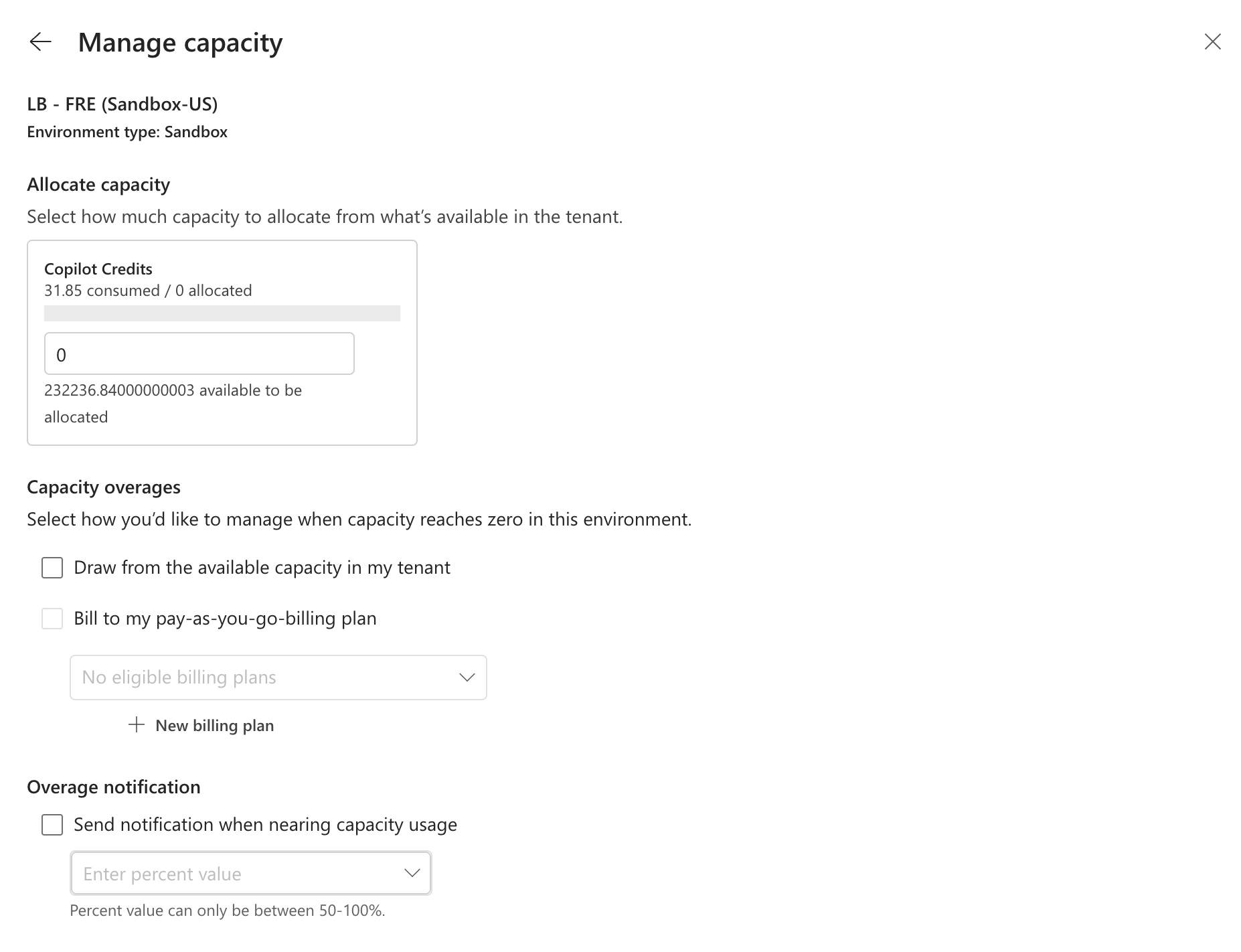
The tenant’s add-on capacity assignment setting controls who can allocate credits. Allowing environment administrators to manage allocations does not restrict them to environments they administer; it gives them allocation rights for all environments in the tenant. Unless that tenant-wide access is intentional, keep allocation rights restricted to tenant administrators.
Configure allocation and enforcement rules through the API
At scale, use Update Allocations By Environment to configure an environment’s allocation and enforcement rules in a single request.
The request below allocates 10,000 Copilot Credits, enables administrator notifications, blocks tenant-pool draw, allows pay-as-you-go overage, and leaves denial of further consumption disabled. This request patches the current configuration, including allocated credits. First read the current allocation, preserve values that should remain, and then submit the complete intended configuration.
PATCH https://api.powerplatform.com/licensing/allocationsByEnvironment?api-version=2024-10-01
Content-Type: application/json

{
  "environmentId": "<environment-id>",
  "currencyAllocations": [
    {
      "currencyType": "MCSMessages",
      "allocated": 10000,
      "enforcementRules": [
        { "ruleType": "Alert", "enabled": true },
        { "ruleType": "TenantPool", "enabled": false },
        { "ruleType": "PayGo", "enabled": true },
        { "ruleType": "Deny", "enabled": false }
      ]
    }
  ]
}
This example uses a raw HTTP call to demonstrate programmatic control. For C# and Python SDK examples, and PowerShell with raw HTTP, see the Learn tutorial on managing credit allocations programmatically. Actions for the Power Platform for Admins V2 connector are also coming soon.
Review controls for new and existing environments
New environments can be created with tenant-pool draw enabled, and existing environment configurations can drift from approved controls. A periodic review and remediation process can work like this.
- Query
microsoft.powerplatform/environmentsfrom Power Platform Inventory. You can adapt the Inventory API request above by changing only the resource type filter. - Compare the results with your governed environment register.
- Classify new or unclassified environments and record approved controls. For existing environments, retrieve the recorded classification and approved controls.
- Read the environment’s current allocation and enforcement rules with Get Allocations By Environment.
- Compare the current configuration with the approved controls.
- Preserve approved exceptions, and remediate any other mismatches.
[Scan environment inventory]
        │
        ▼
   New or unclassified?
     │            │
    Yes           No
     ▼            ▼
[Classify and    [Retrieve existing
 record approved  classification and
 controls]        approved controls]
     │            │
     └─────┬──────┘
           ▼
[Read current allocation and enforcement rules]
           │
           ▼
   Do current controls match?
     │            │
    Yes           No
     ▼            ▼
[No action]   Approved exception?
                │        │
               Yes       No
                ▼        ▼
          [No action]  [Apply approved configuration]
In step 4, use the read endpoint below to check the current allocation and enforcement rules before deciding whether remediation is required.
GET https://api.powerplatform.com/licensing/allocationsByEnvironment/<environment-id>?api-version=2024-10-01
Apply agent-level limits
Environment controls set boundaries for shared capacity. Agent-level limits add a monthly boundary for an individual use case, regardless of whether the environment uses prepaid capacity or pay-as-you-go billing.
For maker development agents, a default value for how much they can consume is the key control for preventing overspend. A repeatable process looks like this.
- Detect newly created GitHub Copilot harness agents.
- Confirm whether the agent is in a maker development environment.
- Apply the organization’s default development limit.
- Notify the agent owner about the limit and what happens when consumption approaches or reaches it.
- Route requests for more capacity through the appropriate approval process.
- Review or replace the development limit when the agent moves into funded production usage.
[Detect new harness agent]
        │
        ▼
   Maker development?
     │            │
    Yes           No
     ▼            ▼
[Apply default   [Set limit based on
 development      expected production
 limit]           usage]
     │            │
     ▼            │
[Notify agent owner]│
     │            │
     ▼            │
 More capacity requested? │
   │      │       │
  Yes     No      │
   ▼      │       │
[Route to │       │
 approval]│       │
   └───┬──┴───────┘
       ▼
 [Review limit periodically]
       │
       ▼
   Has purpose changed? ── Yes ──▶ (Return to maker development decision)
       │
      No ──▶ (Continue periodic review)
This gives makers room to explore without leaving consumption unbounded. Because limits apply to agents, not users, consider how many agents a single maker can create when defining defaults and the escalation process.
Production agents can also use limits to protect shared capacity, but the value should reflect expected usage and service criticality rather than simply inheriting the maker development default.
Agent-level limits do not cap aggregate consumption across an environment. As of August 2026, Microsoft announced environment-level limits through Message center item MC1451872, which fills this gap. Until then, you can review usage and unlink billing policies to prevent additional environment-level consumption.
Configure agent limits in PPAC
In PPAC, go to Licensing > Copilot Studio > Manage Agents. Select an agent, set the monthly Copilot Credit limit, and choose whether administrators are notified when consumption approaches the limit and whether additional usage stops when the limit is reached.
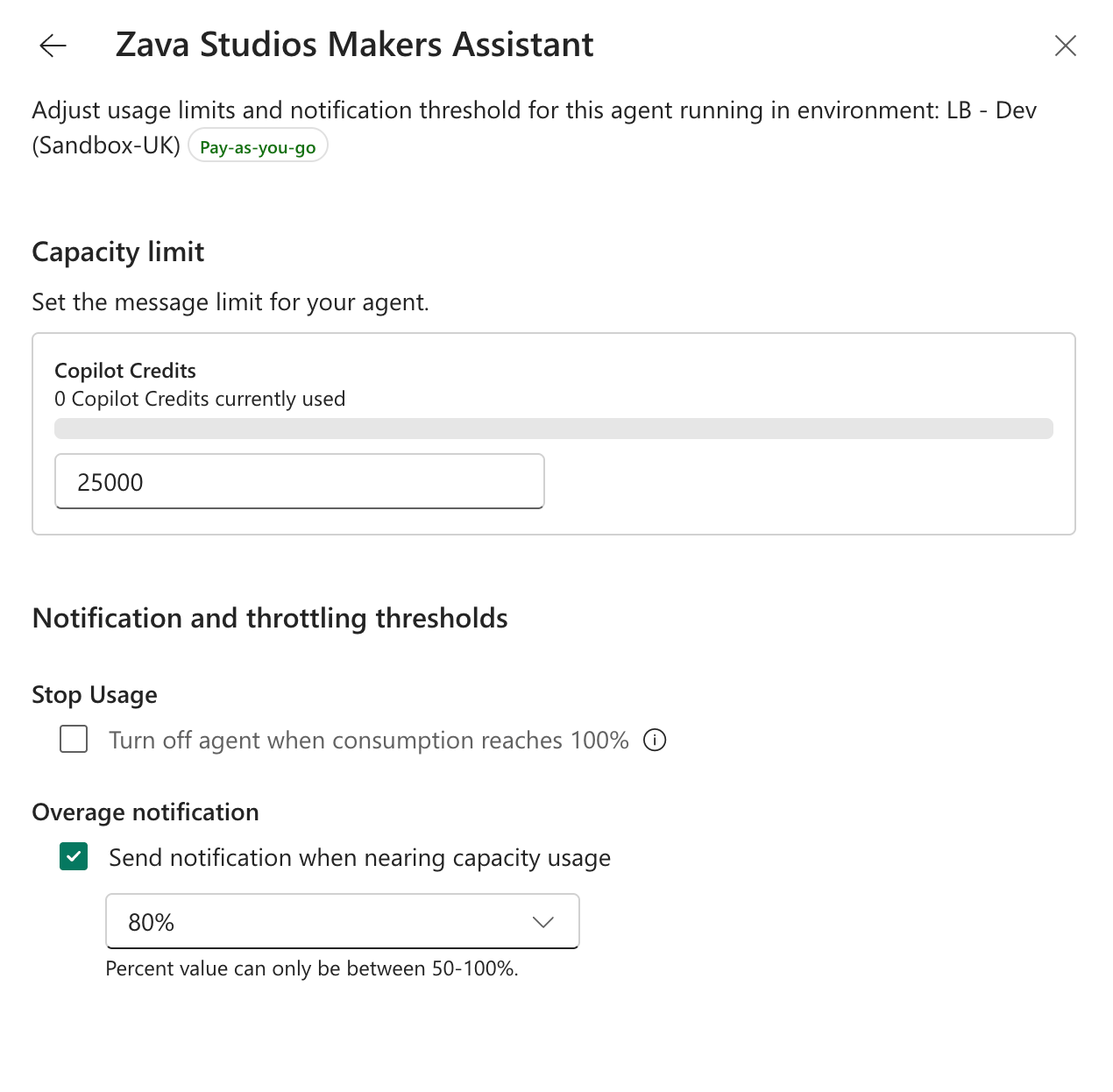
Built-in limit notifications are sent to tenant administrators and environment administrators, not necessarily to the agent owner. Define who reviews those alerts, who contacts the owner when context is needed, and who can approve a limit increase or allow the agent to stop.
As an alternative to in-product notifications for percentage consumed against a limit, administrators can implement their own consumption review and notification process. Get Many Environment Entitlements returns entitlement consumption data for an environment, which you can use to decide who should be notified about what and when.
GET https://api.powerplatform.com/licensing/environments/<environment-id>/entitlements?api-version=2024-10-01
Configure agent limits through the API
At scale, use Update Resource Threshold to apply the approved limit, notification threshold, and stop behavior. The request below sets the limit to 1,000 credits, notifies administrators at 80%, and prevents further consumption when the limit is reached.
PUT https://api.powerplatform.com/licensing/environments/<environment-id>/entitlements/MCSMessages/resources/<agent-resource-id>/threshold?api-version=2024-10-01
Content-Type: application/json

{
  "stopResource": false,
  "limit": 1000,
  "stopIfOverCapacity": true,
  "notifyIfOverCapacity": true,
  "notificationThreshold": 80
}
Make sure stopResource is set to false so the agent is not stopped immediately. This value stops usage at request time regardless of the limit, and it behaves the same way as the stop-agent action in Manage Agents in PPAC.
Summary
Agents built with the GitHub Copilot harness create new scenarios where credit consumption must be managed. For maker development scenarios, set agent limits that allow some exploration. For funded production usage, carefully balance control and enablement by enforcing controls and limits that match the use case. Which parts of this process will you manage in PPAC, and which will you automate through the Power Platform API?