The New Copilot Studio Agent Sandbox
How the Copilot Studio agent sandbox turns model reasoning into executable work such as real file generation and calculations, and how it safely manages external access.
Translated article — This article is based on The New Copilot Studio Agent Sandbox by chrisgarty (@chrisgarty) on The Custom Engine (2026-07-20). The original wording takes precedence.
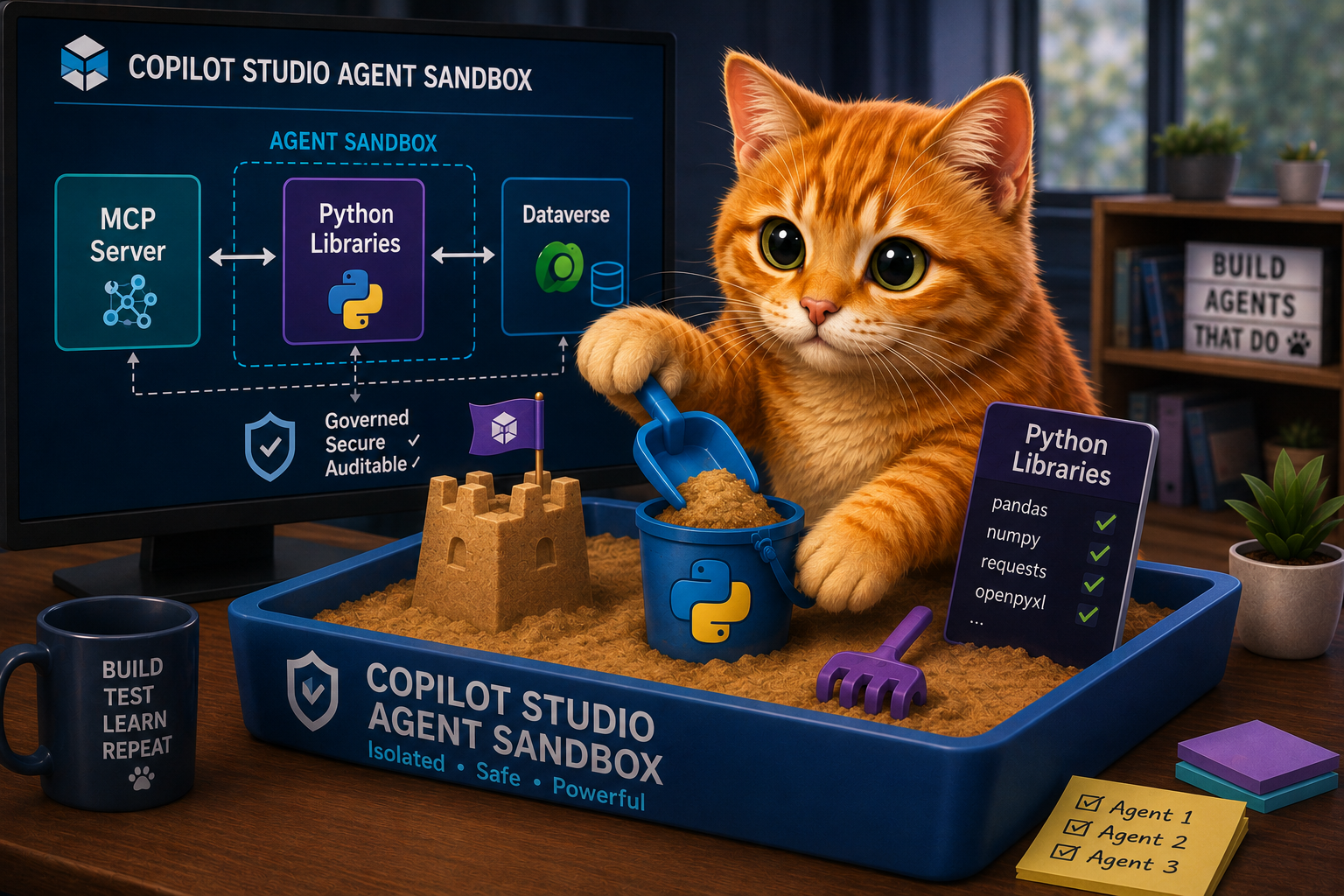
Typically, there are two things you should not ask a large language model to do directly: perform calculations, or generate large, exact payloads such as a filled spreadsheet, a valid .docx, or a long JSON document. A model predicts a plausible result; it does not actually compute it. The number it returns is not guaranteed to be the correct sum, and the file it emits is not guaranteed to be valid.
What language models are genuinely good at is writing code that does those things. A few lines of Python can total a column exactly, or build a file byte for byte the same way every time. But code is useful only if something can run it, and that requires an execution environment.
In Copilot Studio agents powered by the GitHub Copilot harness, that execution environment is the agent sandbox.
Why give an agent a sandbox?
If you have used a coding agent such as GitHub Copilot CLI on your own machine, the basic idea will feel familiar. The agent can work in a terminal: inspect files, write code, run it, read the output, fix it, and try again.
The Copilot Studio sandbox gives an agent that kind of working environment without requiring you to provision and manage a machine. It is a container environment with a Python runtime, local files, preinstalled libraries, and shell tools, all managed by Copilot Studio.
The sandbox is part of the broader agent harness. Instructions, Knowledge, Skills, and Tools help the model understand and act on a task. As explained in Modern Agents Have Skills Now, a Skill brings task-specific instructions and scripts when they are needed. The sandbox gives those scripts a place to handle the local, executable part of the work.
Take Knowledge as an example. Copilot Studio uses the sandbox even for its own retrieval pipeline. When an agent retrieves files from Knowledge, those files are stored in the sandbox, and the agent can open them, analyze them with Python, or draw charts. Without the sandbox, the agent would be limited to the snippets returned by retrieval. With the entire file in the sandbox, it can work across every row.
Demonstrating what the Copilot Studio agent sandbox can do
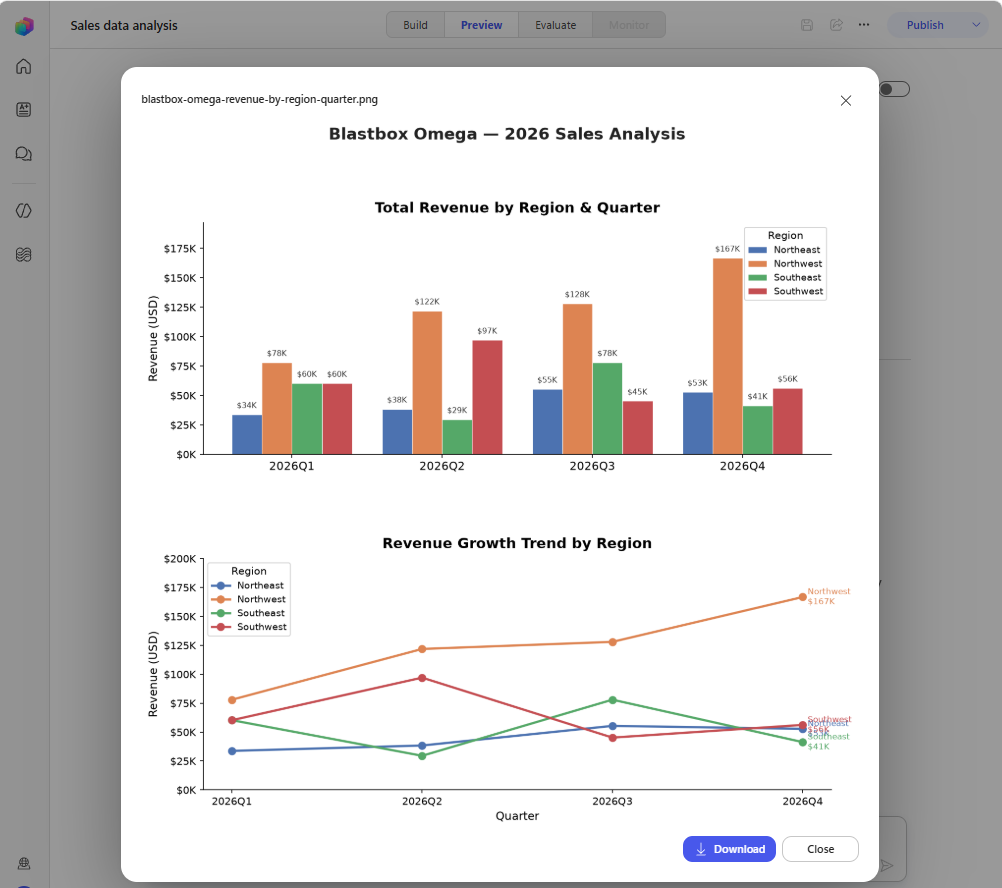
Here is a quick demo you can try yourself. Download the sample sales data, a fictional orders dataset that deliberately has no revenue column. The totals have to be calculated, not looked up. Create an agent, add the CSV as a Knowledge file, and ask it: “Generate a chart for the sales data showing revenue growth per region per quarter.”
Make agent behaviors more repeatable with Skills
In the demo above, the agent wrote the code itself. With Skills, you can provide the code in advance. Package a reviewed script together with instructions for how to use it, and a specific task runs the same way every time. The document redlining example shows this well. The sandbox runs a script against the provided documents and creates the finished Word file.
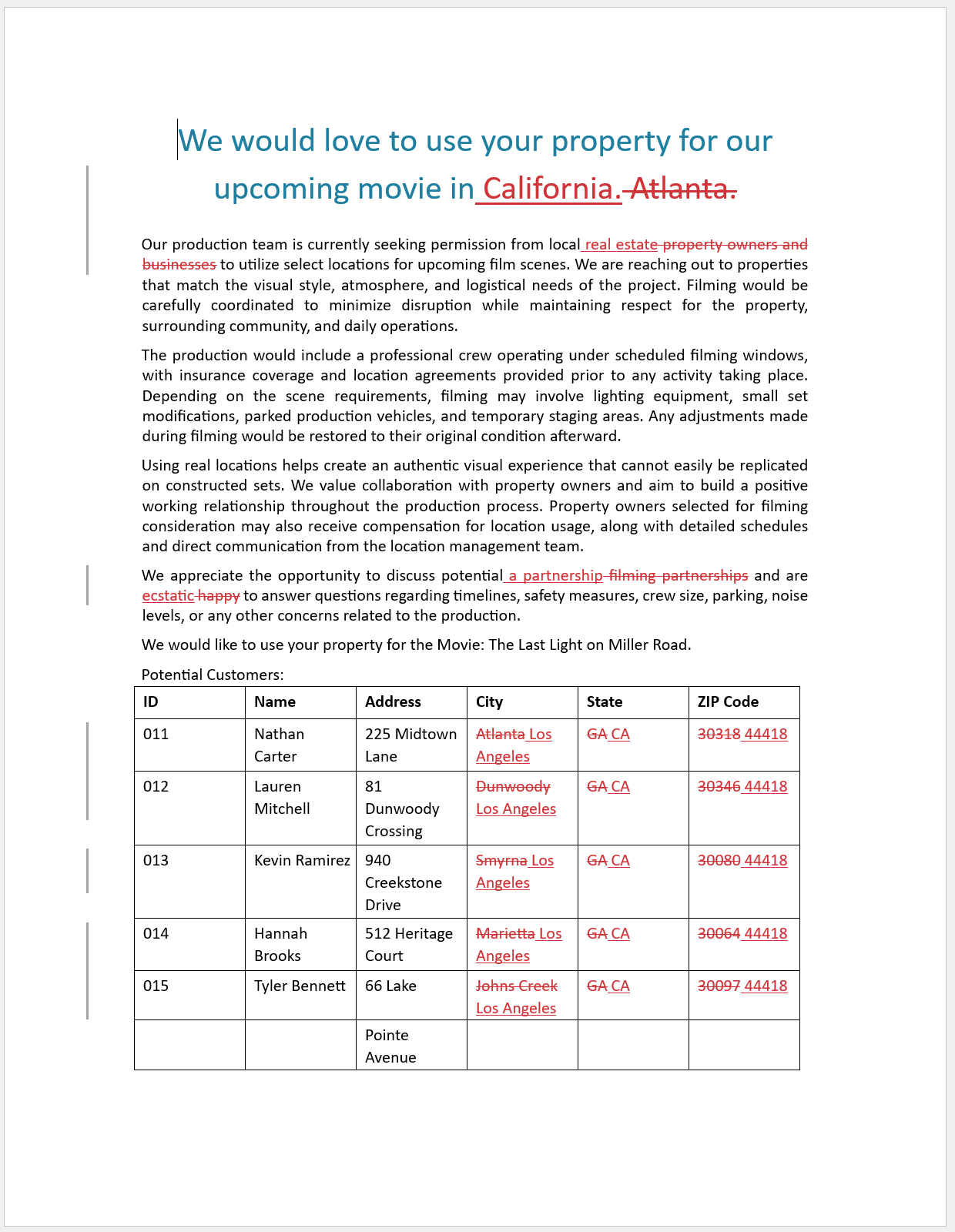
The agent can return the file to the user, and if further changes are needed, revise it in the sandbox.
Live-generated code, or a script you packaged yourself?
Code reaches the sandbox in two main ways.
- Code generated for the task. The model can write Python, run it, inspect the result, and revise it. This is useful for novel work, such as understanding an unfamiliar export file or finding a useful way to chart a newly uploaded file. The trade-off is that writing and iterating on code takes time, and the implementation may differ between runs.
- A script packaged in a Skill. A prewritten script is ready to run immediately. For repeatable work, it is usually faster and more consistent, and your team can test and version it like any other code asset.
The maker does not choose between these paths for every conversation. You give the model good options, including Skills with clear descriptions, and the model decides what to use at runtime.
The practical rule is this: give the model room to generate code for novel work. For repeatable work, provide a reviewed script in a Skill so the agent can run it immediately and consistently. Then use evals to verify that the overall agent still behaves as intended. The quality gate pattern shows one way to automate that check. Packaged Skills travel with the agent and follow the normal application lifecycle management (ALM) process.
What the sandbox unlocks
The sandbox ships with libraries for working with documents, spreadsheets, PDFs, data, charts, and images. The exact package names matter less than the agentic loop those libraries enable. The agent can create a file, run a command, inspect the result, adjust its approach, run another command, and keep iterating.
That means an agent can do things like this.
- Calculate a prorated bonus, run what-if scenarios on numbers, and validate formulas — with the arithmetic done in code, not by the model.
- Turn an uploaded spreadsheet into a cleaned workbook, calculated summary, and chart.
- Compare documents and return a redlined Word file.
- Extract content from a PDF, run a set of checks, and generate a findings report.
- Transform supplied data into a presentation or another formatted artifact.
For makers, this removes the need to build a separate service every time a calculation or file transformation is required.
No network egress from the sandbox
The sandbox has no outbound network path. Code running in the sandbox cannot call APIs, send email, or write files to SharePoint, no matter which libraries it imports.
For example, the requests Python package is installed, but anything you build with it cannot leave the sandbox. Access outside the sandbox is possible only through the paths you configure: Knowledge sources for grounded information, and Tools such as connectors and MCP servers for live data and external actions.
For administrators, that boundary is the reassurance. Execution is managed by Copilot Studio, and because those two paths are the only exits, everything the agent does externally stays within governance controls and data policies.
The sandbox is temporary
The sandbox is a working area, not permanent storage. If a redlining agent creates contract-redlined.docx, it needs to return that file to the user or save it somewhere durable through a configured Tool. Do not design the next conversation around the assumption that the same file will still be in the sandbox.
Agent Memory, when enabled, persists facts and context across conversations. It does not store files, so it is not a way to preserve sandbox output.
How do I know what is available in the sandbox?
When building an agent, you may want it to write and run code, or you may be writing a script yourself to package into a Skill. Either way, you need to know what is already installed in the sandbox. The simplest way is to ask the agent directly which runtime, libraries, Tools, and Skills it can access.
For a repeatable and detailed inventory, the agent-harness-explorer Skill runs the inspection automatically and creates a standalone HTML report. As of 2026-07-21, a report generated from an otherwise empty Copilot Studio agent showed Python 3.12.9 in a container, 99 Python libraries, 11 built-in tools, 8 Skills, and no MCP servers configured for that agent.
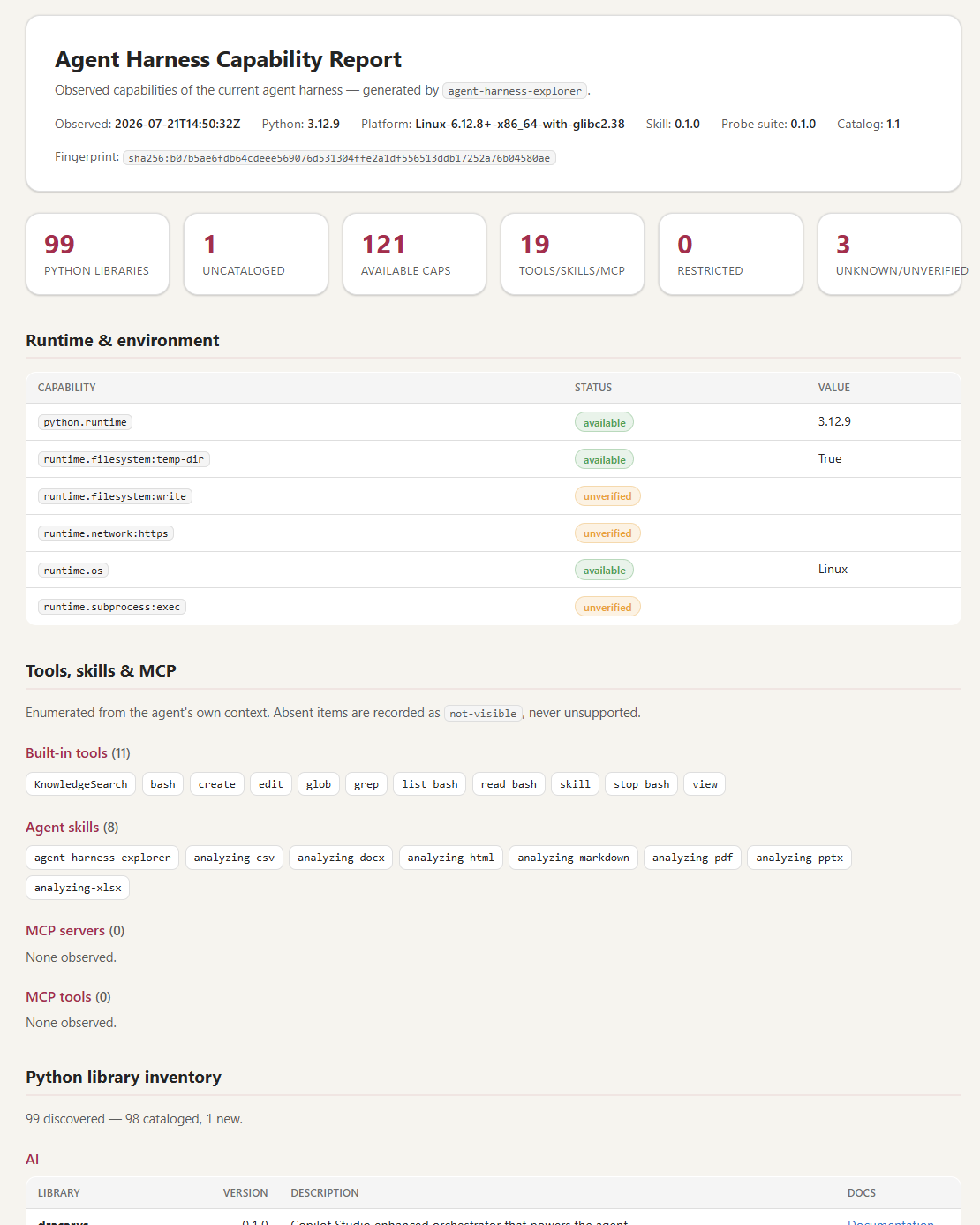
To create an agent and generate an agent harness explorer report:
- Download the agent-harness-explorer bundle (zip) from the cat-agent-skills skills library.
- In Copilot Studio, create or open an agent that uses the GitHub Copilot harness.
- On the Build tab, click “Skills +” in the right panel to add an existing Skill.
- Upload the zip file and wait for the Skill to load.
- Open the Preview tab.
- In the agent chat, enter “Please inspect the harness” (harness/sandbox/environment).
- Review the activity trace to see the tools and scripts used to generate the report.
- Open and review the “harness-inspection-report” HTML report.
If Agent Memory is enabled, you can ask the agent to “Capture a snapshot” so it can be saved for later comparison. These comparisons can show capabilities added over time.
Ready for action
The sandbox is what lets Copilot Studio agents inspect, calculate, create, and iterate directly instead of stopping at explanations. Calculations run in code rather than in the model’s head, files are built and validated in a real environment, and the limits are clear. The only external paths are the Knowledge and Tools you configure, and nothing remains when the conversation ends.
Now that Copilot Studio agents are this powerful, what business problem will your next agent help solve?