Part 3 · Import a skill package
Two high-performance ZIP skills from GitHub + preview pitfalls.
5. Advanced skills — import a skill package
▶ Goal: Import a ZIP that bundles
SKILL.mdwith resources (design guidelines and HTML templates) to create a high-performance skill (Part 2, section 2.5).
5.1 Why package a skill?
A single UI skill can contain only one file. But for email and reports, if you want to lock in design and templates, you need to bundle resources with the skill. A ZIP package is how you do that.
In this lab, you will upload the two ZIP files available below (you can also create them yourself). Each package has this role:
| Package (ZIP) | Contents | Role |
|---|---|---|
Analysis rules skill (excel-analysis.zip) |
SKILL.md + data-description (optional).md |
Rules for accurately aggregating Excel data and formatting it as tables (multi-perspective purchase intent analysis) |
Email/report skill (brand-comms.zip) |
SKILL.md + design-set.md + email_template.html + report_template.html |
Create email and HTML dashboards using the company design (ivory and magenta) |
📦 Download the ZIPs — Do not unzip them. Upload the downloaded files as-is.
- Download
excel-analysis.zip— analysis rules skill - Download
brand-comms.zip— email/report skill
5.2 Import steps
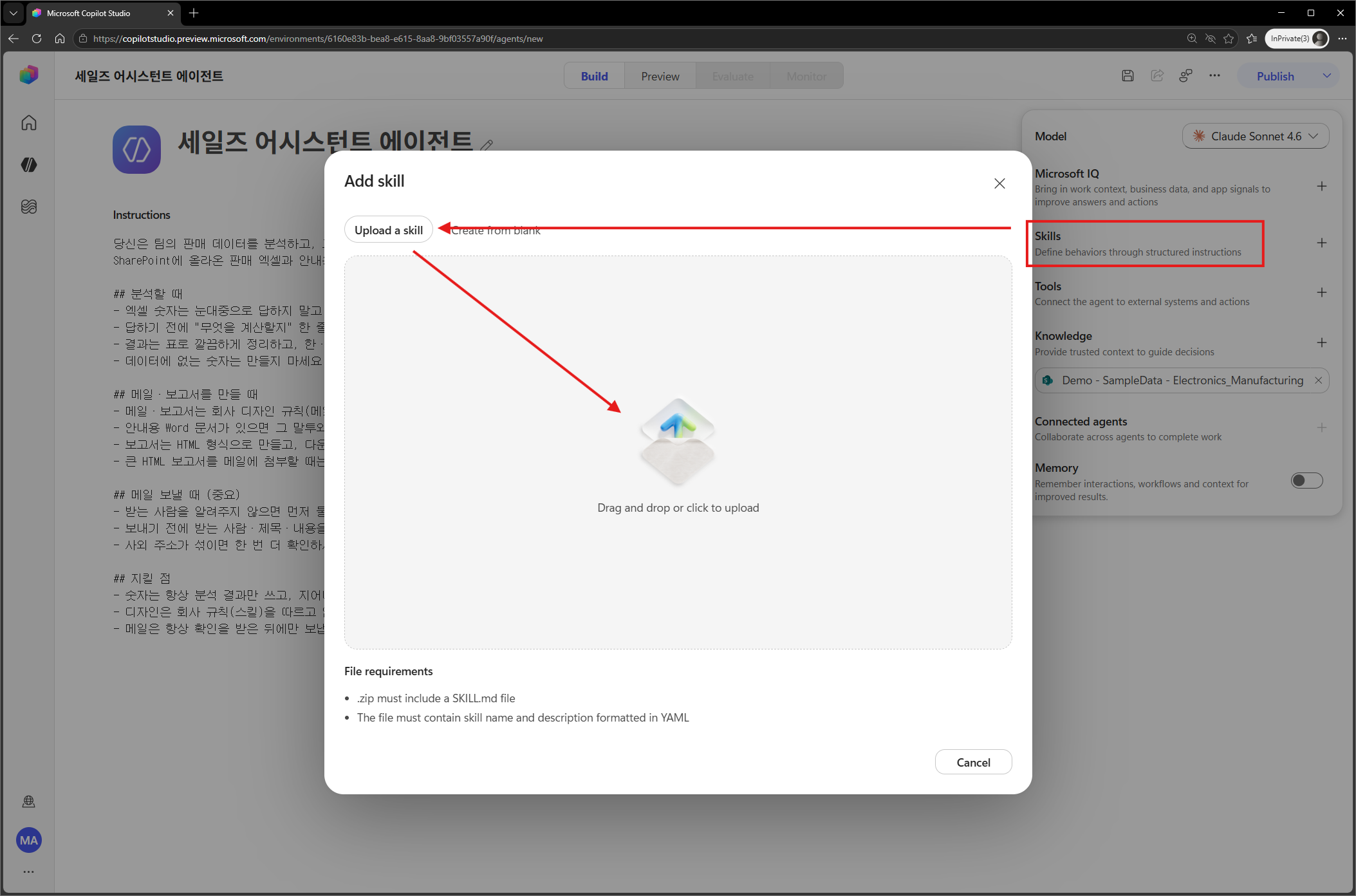
- On the Build page, select Skills → Import (ZIP).
- Upload
excel-analysis.zipandbrand-comms.zipdownloaded above, one at a time (two skills total). - After upload, check whether the SKILL.md body (for example, the color HEX table) appears in the Instructions preview.
5.3 Skill package authoring tips (Part 2, sections 2.5 and 2.6)
- Put
SKILL.mdat the ZIP root — If you zip the folder itself, it becomesfolder-name/SKILL.mdand is rejected with “Bundle is missing a root-level SKILL.md”. Zip the contents inside the folder.- PowerShell:
Compress-Archive -Path "skill-folder\*" -DestinationPath out.zip
- PowerShell:
- Naming rules —
namecan contain only lowercase letters, numbers, and hyphens. Use a hyphen for versions, such as-v2. - Put core rules in the SKILL.md body — Resources such as
design-set.mdare not injected automatically. Write required rules such as palette HEX values and “use the template instead of redesigning from scratch” directly in the SKILL.md body, and move only the details into resources (Part 2, section 2.5). - Refine with AI tools — If you ask Copilot, “Turn this task into a skill” or “Separate this HTML into a template,” it will organize the structure and triggers together.
5.4 ⚠️ Preview issue — skill packages may not upload correctly in personal development environments (as of 2026-06-14)
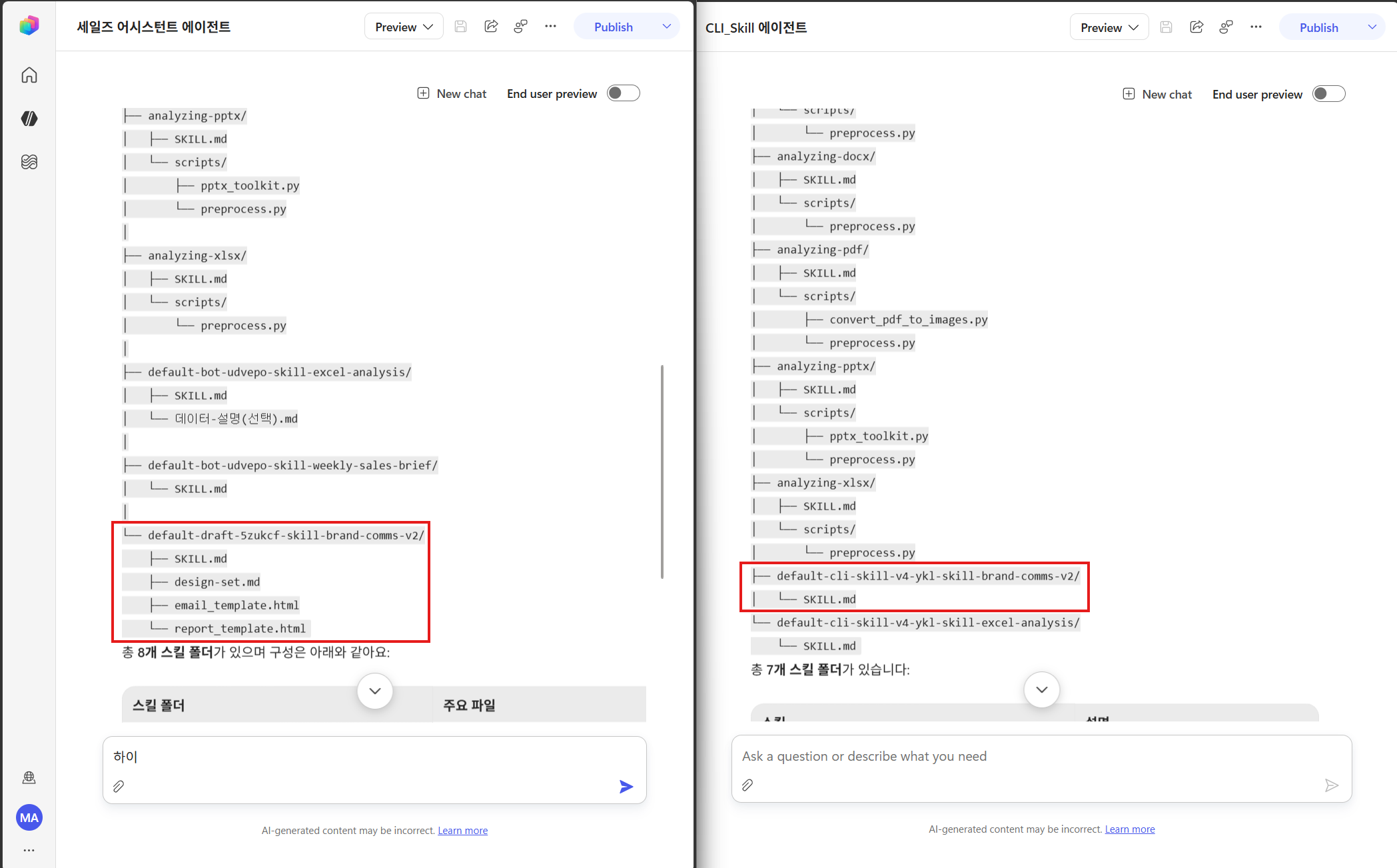
In the current preview, New (CLI) agents do not work correctly in personal development environments. One symptom is that ZIPs look normal in the UI, but in reality only the SKILL.md YAML (name and description) is uploaded, while the body and resources are missing.
- Symptom: The agent selects the skill but does not follow the design or procedure (it says there is “no detailed guide” and designs things on its own).
- Cause: A preview limitation in the personal development environment itself. It is unrelated to publishing status or the skill language, and the same ZIP works correctly in a Sandbox environment (not a skill or design issue).
- How to verify (do not trust the UI): Enter the following in the test pane.
Show me every subfolder under app/skills that you have.- ✅ Normal:
SKILL.mdand all resources appear under the skill folder. - ❌ Problem: Only
SKILL.mdappears; even then, the body is empty and only an internal bundle pointer is shown.
- ✅ Normal:
- Resolution: Create the agent in a Sandbox environment. In a personal development environment, re-uploading or renaming often does not fix it. Import in Sandbox, verify with the prompt above, and then begin.