Modern Agents Have Skills Now — Here's How They Work in Copilot Studio
How Skills work in modern Copilot Studio agents — instructions and resources loaded on demand for specific scenarios, why instructions should be modularized into Skills, and when to separate Skills from instructions.
Translated article — This article is based on Modern Agents Have Skills Now — Here’s How They Work in Copilot Studio by roels (@roels) on The Custom Engine (2026-06-15). The original wording takes precedence.
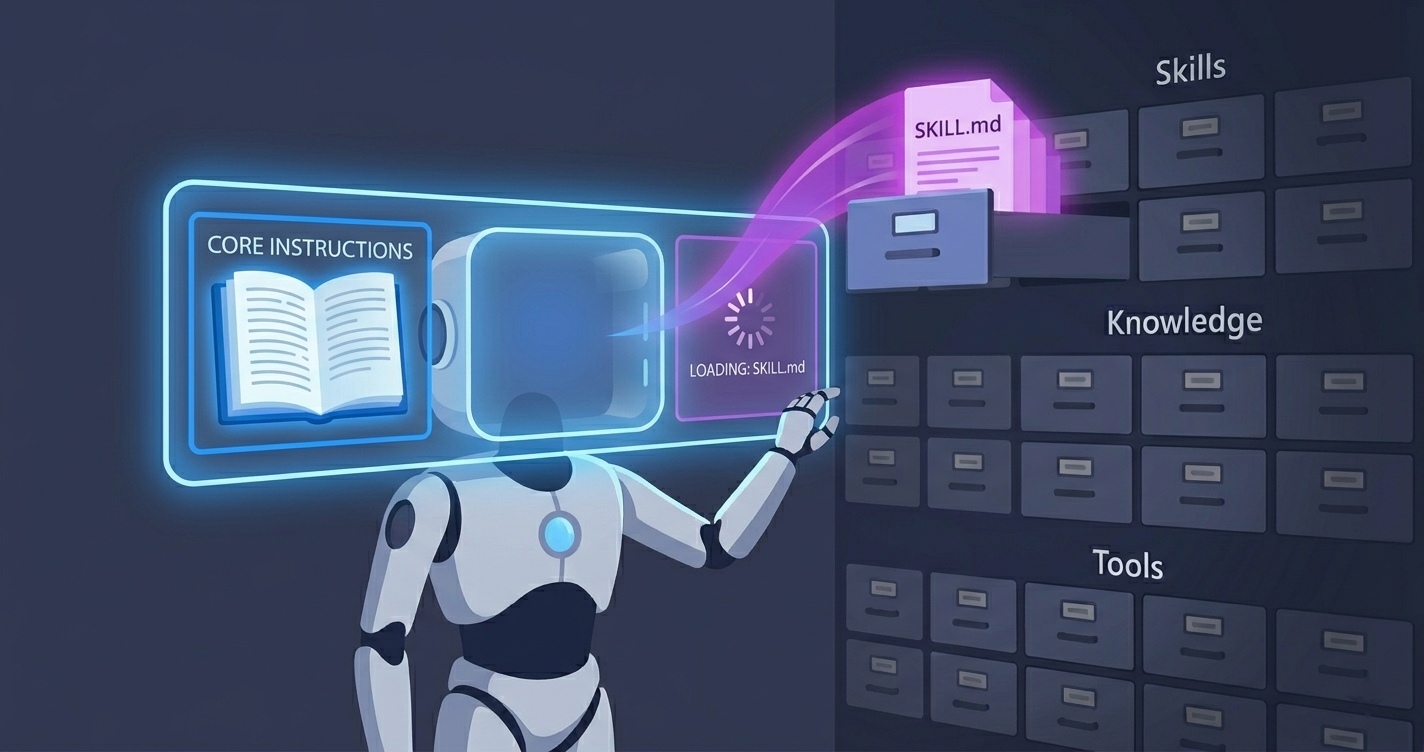
LLMs are good at common cases, the ones that do not require specific knowledge of your organization. Where they might do less well is everything that does: the context, conventions, data, and know-how a model cannot infer on its own. Procedural know-how especially — the step-by-step way your organization handles something — is hard for an LLM to figure out by itself, so you end up writing it down. But if you pour all of that into the agent’s context all the time, that is exactly where agents get bloated and unpredictable. Modern agents have a cleaner place to put this situational part: Skills.
If you have spent time with coding agents recently, you have probably already seen them. At its core, a Skill is instructions (and optionally resources such as examples, templates, or scripts) that an agent loads on demand, only when a specific kind of task comes up. A SKILL.md file contains the name, description, and instruction body, and the name and description tell the agent when the Skill is relevant.
That same idea has now arrived in the modern Copilot Studio agent experience. This article covers what Skills are, why agent builders should care, and how they work specifically in Copilot Studio.
Why agent builders should care
Skills are based on the Agent Skills open format, an open standard originally developed by Anthropic. The shape is deliberately simple. A Skill is just instructions, so the real question is why you would break instructions out into a separate Skill at all. It comes down to four things.
- Manageability. Instead of one ever-growing instruction blob, each Skill is a focused, self-contained unit you can reason about, review, and version one at a time.
- Context management. Skills load on demand. By default, the agent keeps only Skill names and descriptions in view, and pulls the full instructions into context only when a task matches. Ten Skills cost you ten short descriptions in every turn, not ten full sets of instructions, so the context window stays lean.
- Accuracy. Use-case dependent, but real. A Skill can carry detailed tool-use guidance: which tool to use, which parameters matter, how to shape a query, what to validate before calling, and what to do when a tool returns nothing. With large or overlapping toolsets, bringing that guidance into context only when it is relevant can make the agent call tools more reliably. It is not guaranteed, so evaluate it rather than assume it.
- Speed and cost. A Skill nudges the agent toward the right approach instead of leaving it to work everything out from scratch. Fewer knowledge searches, tool calls, and reasoning loops mean fewer round trips before the agent answers, reducing response latency, increasing throughput under load, and lowering conversation cost. Like accuracy, this is use-case dependent, so validate it rather than assume it.
That is the short version. Manageability and context management are structural benefits and apply almost everywhere. Accuracy and speed depend on your agent.
The same benefits show up in Copilot Studio
The good news is that the modern Copilot Studio orchestrator works the same way. It can reason over the set of available Skills, select the relevant Skill, and bring its instructions into context only when the conversation needs it.
[User prompt]
      │
      ▼
┌───────────── Agent default context ─────────────┐
│  Full instructions                              │
│  Knowledge metadata (A, B, C)                   │
│  Tool metadata (A, B, C)                        │
│  Skill metadata (A, B, C)                       │
└───────────────────────┬────────────────────────┘
                        ▼
        "Context evaluation: which Skill matches?"
                        │  (example: Skill B matches)
                        ▼
   Load Skill B's full instructions (+ optional examples/resources)
                        │
                        ▼
   Agent execution: general instructions + Skill B + needed knowledge/tools
This is not specific to Skills. Knowledge sources, tools, and Skills are all registered the same way: by default, only metadata is in context, and the full content is pulled in only when the prompt calls for it. The agent’s own instructions are the exception; they are always loaded in full. Because Copilot Studio loads Skills on demand in this way, the benefits above — manageability, context management, accuracy, and speed — carry over directly.
Working with Skills in Copilot Studio
Add a Skill
Skills live in the agent’s Skills tab. Today there are two entry points: create a Skill from blank, or upload an existing Skill. An upload can be a standalone SKILL.md file, or a .zip that bundles SKILL.md with additional resources, such as Python scripts referenced by the Skill.
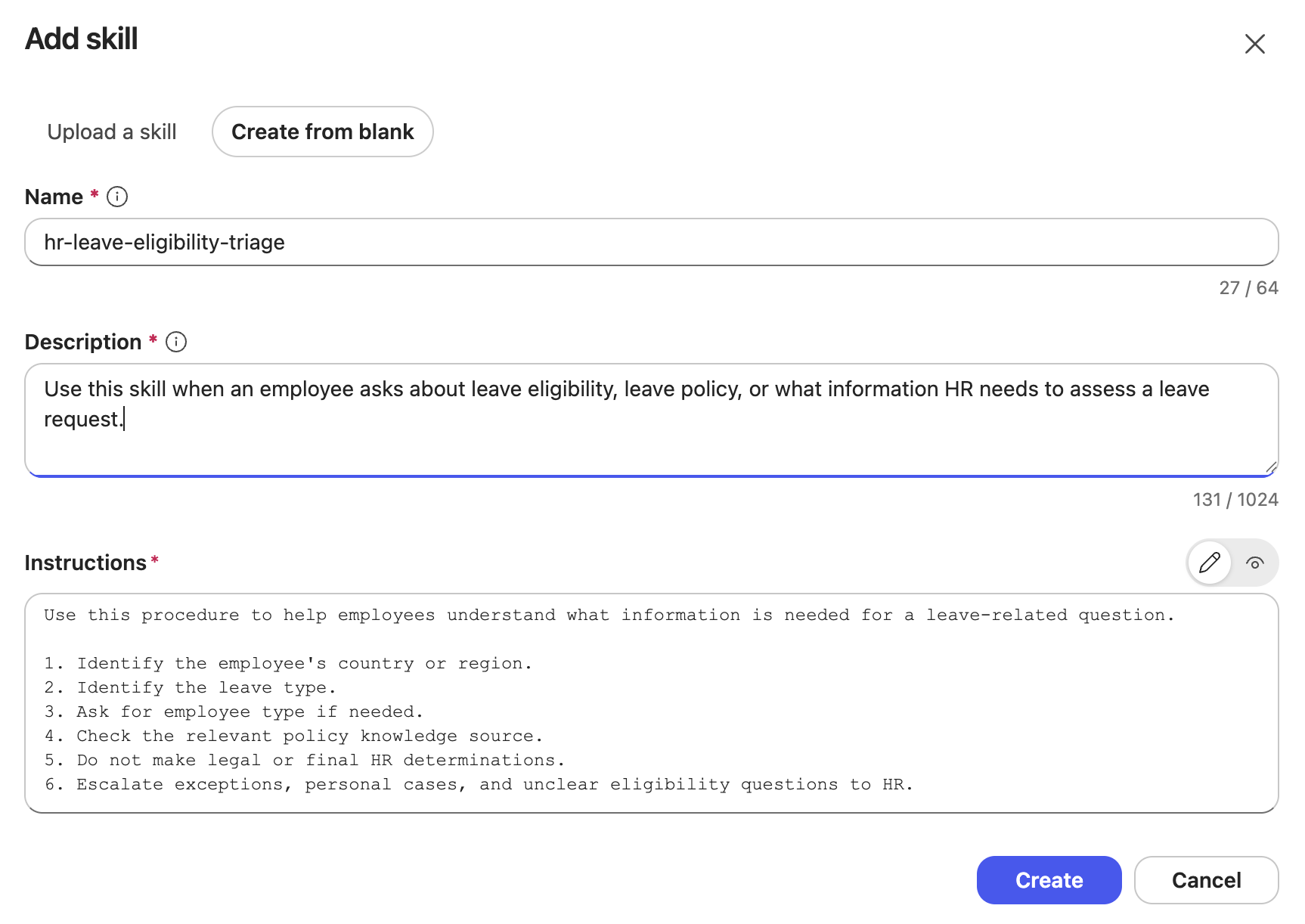
Once added, the Skill becomes part of the agent. It is scoped to that agent and travels with it. Add the agent to a Power Platform solution, and the Skill moves with it through the ALM lifecycle.
Invoke a Skill
You do not directly “call” a Skill. When the conversation matches, the orchestrator selects it based on the Skill’s name and description. You can watch this happen in the agent’s reasoning view.
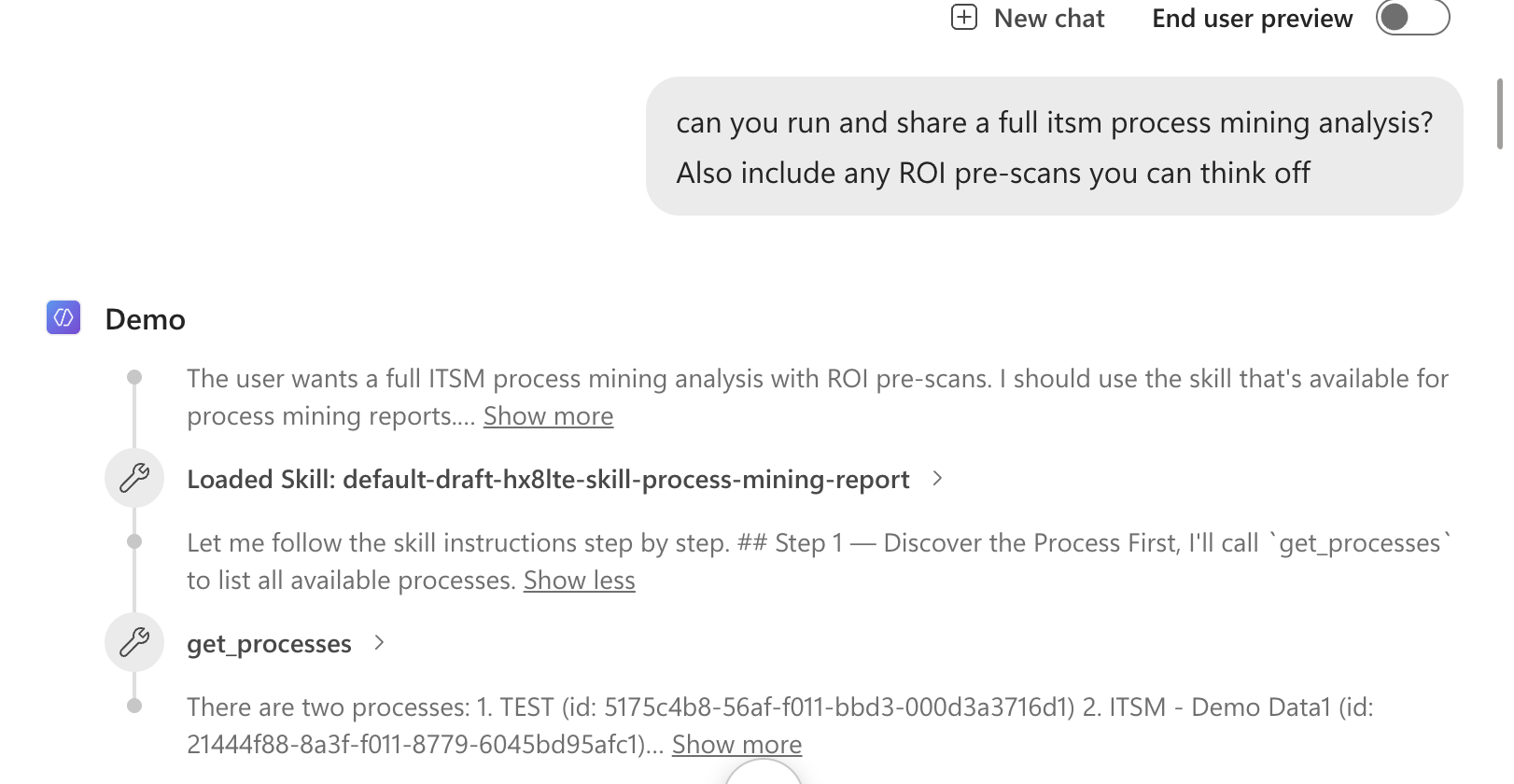
This reasoning view is also the main debugging surface. If a Skill fires too often, the description is probably too broad. If it never fires, the description is too narrow or does not match the words your users actually use.
Write the description like routing metadata
This is worth dwelling on, because it is the part makers most often get wrong. The name and description are not documentation for humans; they are the routing signal the orchestrator uses to decide when the Skill applies. Treat them that way.
- Name specifically:
HR Leave Eligibility Triage, notHR Help. - Say when to use it and when not to: “Use for leave eligibility and required documentation. Do not use for payroll or benefits enrollment.”
A precise description gives the orchestrator a clear routing target. A vague description (“Helps with HR questions”) invites the wrong Skill to fire, or none at all. If two reasonable makers would disagree about when a Skill applies, the description is not specific enough yet.
Copilot Studio Skills and the open format
If you come from coding agents, there is good news. Copilot Studio Skills follow the same Agent Skills open format. A Skill folder can bundle more than instructions.
my-skill/
├── SKILL.md          # metadata + instructions
├── scripts/          # optional executable code
├── references/       # optional documentation
└── assets/           # optional templates, resources
Copilot Studio supports this full shape today. A Skill carries SKILL.md instructions, can bundle resources (reference files, examples, templates) and executable scripts, and all of it is loaded on demand when the Skill is selected. How to put those resources and scripts to work deserves its own walkthrough and will be covered in a follow-up post. For now, two things about how Copilot Studio handles the bundle are worth calling out.
- Distribution is per-agent, for now. Coding-agent ecosystems let you distribute Skills as plugins across products and tenants. As of June 2026, Skills in Copilot Studio are scoped to their agent and move with that agent through solutions and ALM, rather than through a cross-product shared catalog. This is the current state, not the end state, and a more catalog-like way to share Skills is being developed.
- Skills can soft-point at the agent’s tools, not just bundled scripts. A Skill can run its own bundled script, but it can also soft-point at existing agent capabilities: actions, flows, connectors, and MCP servers. It is “soft” because the Skill only references the capability; it does not bind to it or grant permission. The Skill can say “use the order-lookup action here,” but there is no guarantee. If the agent does not already have that tool, the instruction cannot be fulfilled, and even if it does, the orchestrator still decides whether to follow the pointer.
How to think about a Skill
A Skill can take whatever shape the job in front of the agent needs. Think of a Skill as any of these.
| Think of a Skill as a… | Useful when the job is… | Example |
|---|---|---|
| A reference manual the agent consults | Understanding a proprietary data model, schema, or domain the LLM does not know | Documenting your data model and query method so a data tool returns the right result |
| A specialist you call in | A narrow area of expertise the agent only occasionally needs | Region-specific tax rules applied only when that region comes up |
| A playbook | There is a known set of plays for a recurring situation | Triaging a support request, then routing by category |
| A standard operating procedure (SOP) | A task must be handled the same, compliant way every time | Handling refunds within policy windows and approval limits |
| A briefing pack | The agent needs background and context before it can act well | Onboarding context read before answering HR questions |
| A checklist | Certain steps or validations must not be skipped | Pre-submission validation before creating a record |
| A protocol | There are firm rules for handling a sensitive case | What to do when a user reports a suspected security incident |
| A runbook | An operational task has defined steps and known failure handling | Running a pipeline: process discovery → analysis → ROI pre-scan → result formatting |
| A template | The output must follow a fixed structure or house style | Generating a report or standard record in a fixed format |
The common thread is this: each one is context-specific guidance the LLM cannot infer on its own, packaged once and pulled in only when it is relevant. Knowledge gives facts, tools give reach, and Skills give the situational know-how to use both well. Crucially, a Skill guides the agent; it does not constrain it completely. The model still reads the situation and decides whether to follow the Skill literally or adapt. That judgment is the whole point of using an LLM. The Skill simply makes sure the right expertise is in the room when the task shows up.
Instructions, or a Skill?
By the time you are weighing instructions against a Skill, one thing is already settled: there is something here the agent cannot infer on its own. (Give an agent a well-described tool or knowledge source, and it can usually work out how to use it from the description alone, so the obvious does not need writing down at all.) What remains — your organization’s context, conventions, data, and rules — is the part you genuinely have to put into words. The only question is where it goes, and the choice is simple.
- Is it true in every conversation and every scenario? Put it in the agent’s instructions. Tone, the agent’s role, always-on guardrails — these are valid 100% of the time, so they should always be in context.
- Does it apply only to specific scenarios? Make it a Skill. If a piece of guidance is not relevant to every turn, keeping it out of the default context and loading it only when that scenario appears is exactly what Skills are for.
[Something you want the agent to know or do]
      │
      ▼
Q1. Can the agent infer it from tool and knowledge descriptions?
   ├─ Yes  → Leave it to the agent (do not write it separately)
   └─ No
        │
        ▼
   Q2. Is it valid for every scenario and conversation?
      ├─ Yes, always true → Put it in instructions
      └─ No, only specific scenarios → Make it a Skill
Two questions decide it: can the agent infer it, and if not, is it always true or situational?
That is the whole distinction. Instructions are the always-on baseline. Skills are everything situational, packaged with a name and description so the agent can reach for the right thing at the right moment. This split is where the benefits above pay off.
- Context management. Situational guidance stays out of the default context, so the context window is less likely to saturate.
- Manageability. Each Skill is a self-contained unit, making the agent easier to manage and change.
- Accuracy. When the right guidance arrives at the right moment instead of forcing the agent to wade through everything at once, it can make better calls. This is per-case, so validate it rather than assume it.
- Speed and credits. Fewer searches, tool calls, and reasoning loops can shorten responses and reduce credit spend — also per-case.
A Skill, or a new agent?
Before Skills arrived in Copilot Studio, the instinct for every distinct task was to build another specialized agent: one for password resets, one for software request approvals, one for incident triage. But often those are not three agents; they are one IT support agent with three Skills. If the same agent serves the same audience and shares the same knowledge boundary, a Skill is the better unit of modularity. You are not building another agent to maintain; you are teaching the existing agent another way of working.
Two signals still point to a separate agent.
- It would stand on its own. An HR assistant and an IT support agent are not one agent with two Skills. They serve different audiences, sit behind different security boundaries, and each makes sense as a standalone agent someone would use independently. When a capability is standalone like that, build an agent. (Standalone is not the same as reusable. Sharing a Skill across agents is a separate question, and the kind of thing an in-product Skill catalog would address later.)
- One agent has taken on too many tools. There is data suggesting accuracy can degrade as more is loaded into an agent’s context, and a growing toolset is part of that load. Past a certain point, adding more Skills will not save it. As always, evaluate this for your own agent rather than assume it. When you hit that wall, the move may be to split the work into a separate agent and delegate to it, rather than pile everything onto one agent.
A word on trust
Because Skills shape agent behavior and can now bundle scripts, they are a trust surface. Treat any Skill you did not write — from a community source, generated by AI, or reused from another environment — the way you would treat untrusted code. Review it before adding it. Check for prompt injection, instructions to misuse tools, and anything that does not match what the Skill claims to do.
What to take away
If you want to go deeper, Influencing Agent Planning with Contextual Instructions covers how always-on instructions steer the orchestrator, Open the Hood: What Your Copilot Studio Agent Is Really Doing shows how to inspect the reasoning that decides when a Skill fires, and Closing the Loop covers how to evaluate whether the right Skill fires at the right moment.
Skills are still early in Copilot Studio, and intentionally focused. But the core idea is already worth internalizing: keep what is true in every conversation in instructions, and move everything situational into Skills the agent can pull in on demand, whether that is a reference manual, checklist, runbook, or playbook.
Skills are new to Copilot Studio, and I would love to hear how you put them to use. What is the first thing you would pull out of your instructions and turn into a Skill?